It's been a long time since I wrote, and the post on Kubernetes Readiness probes has been long overdue. If you haven't checked out the first part of this post on Kubernetes Liveness Probes, I suggest you to check that out. In this post, we will be looking mainly at the Readiness Probe and how it can be used to monitor the health of your applications.
As discussed earlier, Kubernetes provides 3 different kinds of health checks to monitor the state of your applications:
Liveness Probe
Readiness Probe
Startup Probe
When you are working with cloud applications, you might come across scenarios when one or more instances of your application might not be ready to serve any requests. In such scenarios, you would preferably not want the traffic to be routed to those instances. Some of these scenarios include but are not limited to:
One of your application instances might be performing a batch operation periodically -- like reading a large SQL table and writing the results to S3
Your application instances might be loading data from a DB to a cache on startup, and you do not want them to serve any traffic until the cache is populated
You might not want your application to serve any traffic if some of the dependent services are down -- for example, if you have an image processing service that works off of files in Amazon S3, you might want to stop directing any traffic to your image processing service if S3 itself is down.
Note: In the above scenario, it is advisable to configure your readiness probe in a way that it is able to differentiate between the dependent service being unavailable vs having latency issues. For example, you would not want your service to stop serving requests if S3 has an increased latency of 100ms.
In most of the scenarios mentioned above, you don’t want to kill the application, but you don’t want to send it requests either. Kubernetes provides Readiness probes to detect and mitigate these situations. Readiness probes can be used by your application to tell Kubernetes that it is not ready to accept any traffic at the moment.

According to the Kbernetes Documentation:
The kubelet uses readiness probes to know when a container is ready to start accepting traffic. A Pod is considered ready when all of its containers are ready. One use of this signal is to control which Pods are used as backends for Services. When a Pod is not ready, it is removed from Service load balancers
What this essentially means is that when the Readiness probe fails for a particular pod of your application, Kubernetes removes that pod from the service mapping and stops forwarding any traffic to it.
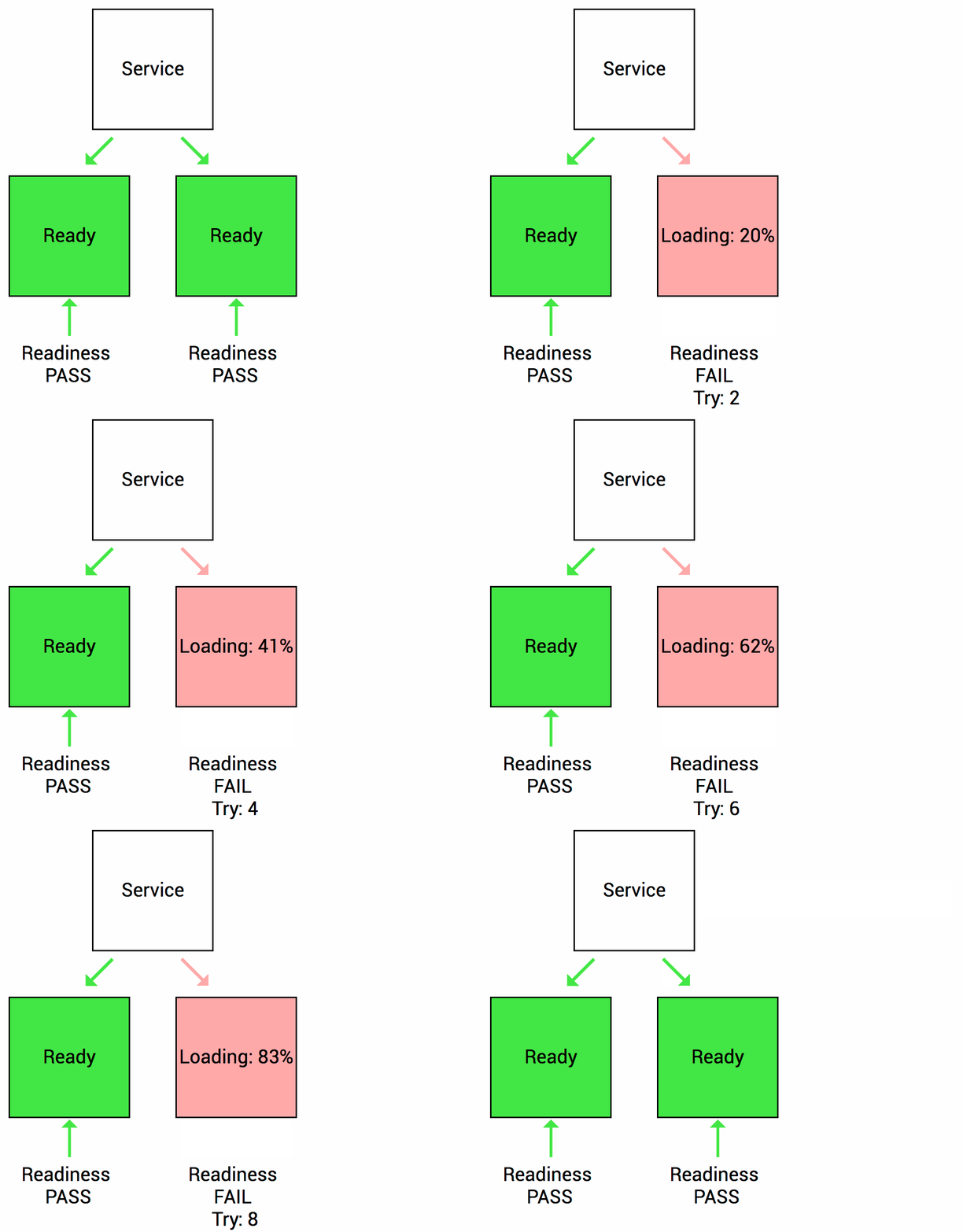
Anatomy of a Readiness Probe
apiVersion: v1
kind: Pod
metadata:
  labels:
    test: readiness
  name: readiness-exec
spec:
  containers:
  - name: readiness
    image: k8s.gcr.io/busybox
    args:
    - /bin/sh
    - -c
    - touch /tmp/healthy; sleep 30; rm -rf /tmp/healthy; sleep 600
    readinessProbe:
      exec:
        command:
        - cat
        - /tmp/healthy
      initialDelaySeconds: 5
      periodSeconds: 5
If you look at the readinessProbe section of the yaml, you can see that the kubelet performs a cat operation on the /tmp/healthy file. If the file is present and the cat operation is successful, the command returns with exit status 0, and the kubelet considers the container to be available and ready to accept traffic. On the other hand, if the command returns with a non zero exit status, kubelet removes the container from the Service/LoadBalancer until the readiness probe succeeds again. No traffic is forwarded to this container until it starts returning success again.
The initialDelaySeconds parameter tells the kubelet that it should wait for 5 seconds before performing the first readiness check. This ensures that the container is not considered to be in an unavailable state when it is booting up. After the initial delay, the kubelet performs the readiness check every 5 seconds as defined by the periodSeconds field.
Apart from generic commands, a Readiness probe can also be defined over TCP and HTTP endpoints which are specially helpful if you are developing web applications.
TCP readiness probe
apiVersion: v1
kind: Pod
metadata:
  name: goproxy
  labels:
    app: goproxy
spec:
  containers:
  - name: goproxy
    image: k8s.gcr.io/goproxy:0.1
    ports:
    - containerPort: 8080
    readinessProbe:
      tcpSocket:
        port: 8080
      initialDelaySeconds: 15
      periodSeconds: 20
This kind of readiness probe is basically a port check. If you want to check if a particular port on your web application is responsive or not, this is the way to go.
HTTP readiness probe
apiVersion: v1
kind: Pod
metadata:
  labels:
    test: readiness
  name: readiness-http
spec:
  containers:
  - name: readiness
    image: k8s.gcr.io/readiness
    args:
    - /server
    readinessProbe:
      httpGet:
        path: /readiness
        port: 8080
        httpHeaders:
        - name: Custom-Header
          value: Awesome
      initialDelaySeconds: 3
      periodSeconds: 3
For an HTTP readiness probe, kubelet polls the endpoint of the container as defined by the path and port parameters in the yaml. If the endpoint returns a success status code, the container is considered healthy.
Any code greater than or equal to 200 and less than 400 indicates success. Any other code indicates failure
Conclusion
In this post we looked at certain scenarios where you might not want an instance of your application to be available to serve requests, and how Kubernetes Liveness Probe helps you identify and mitigate such scenarios effectively. Stay healthy and stay tuned.

Happy Coding! Cheers :)